1、右键点击任务栏空白处。

2、点击“显示触摸键盘按钮”。
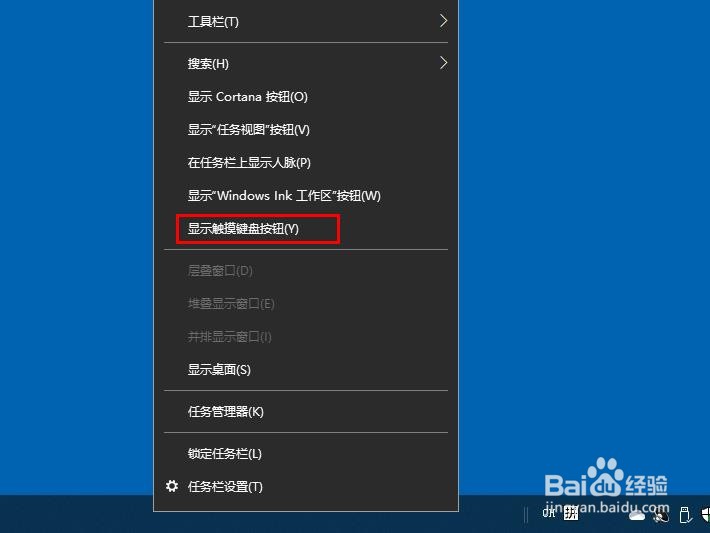
3、点击任我栏出现的触摸键盘按钮将其打开。

1、在任务栏搜索框输入“触摸键盘”将其打开。

1、右键点击开始,选择“运行”。
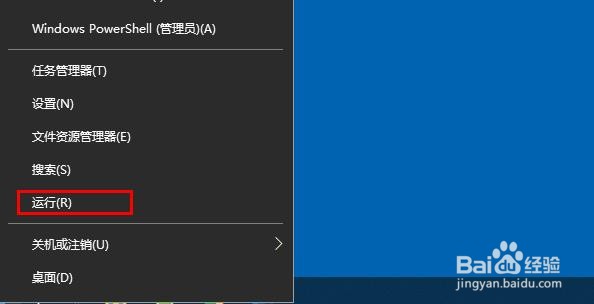
2、输入“tabtip”点击“确定”将其打开。

1、打开此电脑/本地磁盘 (C:)/Program Files/Common Files/microsoft shared/ink,

1、右键点击任务栏空白处。
2、点击“显示触摸键盘按钮”。
3、点击任我栏出现的触摸键盘按钮将其打开。
1、在任务栏搜索框输入“触摸键盘”将其打开。
1、右键点击开始,选择“运行”。
2、输入“tabtip”点击“确定”将其打开。
1、打开此电脑/本地磁盘 (C:)/Program Files/Common Files/microsoft shared/ink,