PowerPoint2016如何设置自动保存时间间隔

时间:2026-02-12 08:54:24

1、首先,打开PowerPoint2016,点击“文件”

PowerPoint2016如何设置自动保存时间间隔

2、点击“选项”

PowerPoint2016如何设置自动保存时间间隔

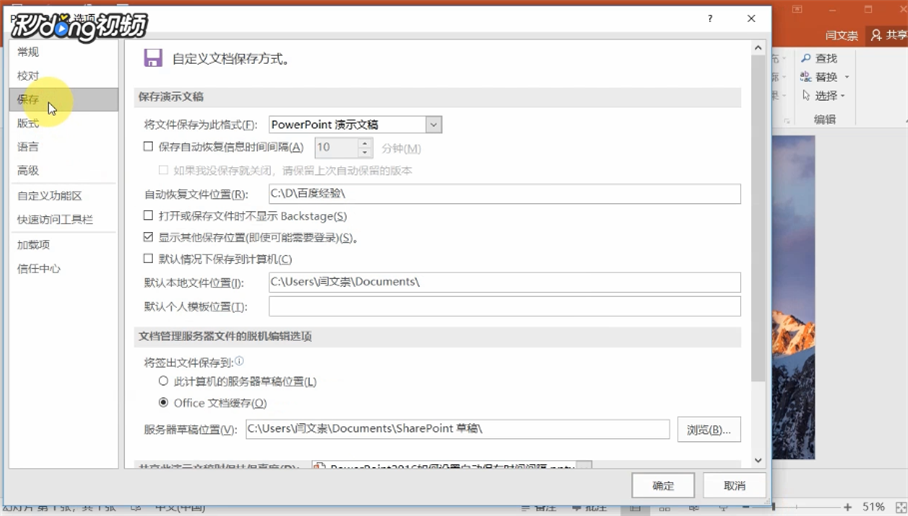
3、然后,在弹出的对话框中点击“保存”

PowerPoint2016如何设置自动保存时间间隔

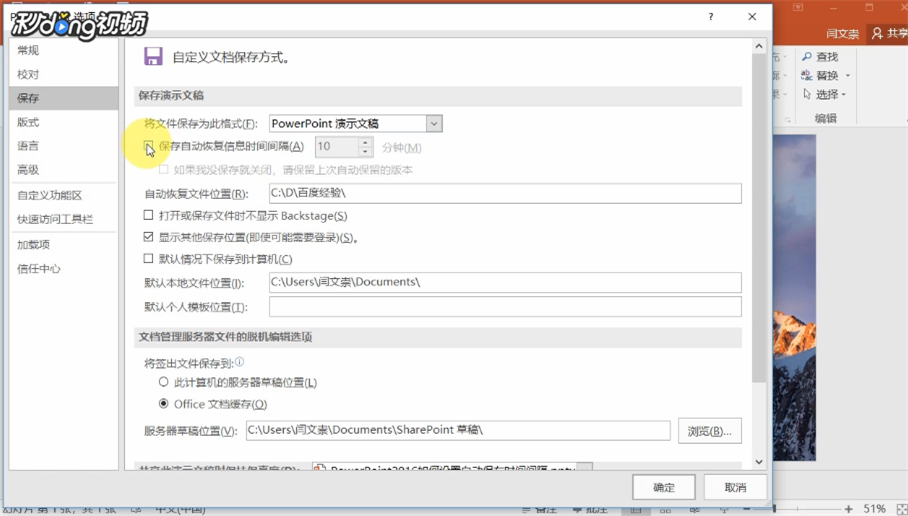
4、勾选“保存自动恢复信息时间间隔”(默认是十分钟,可以根据自己的需求调节,建议将其设置短些,可以减少文件意外丢失的风险程度)

PowerPoint2016如何设置自动保存时间间隔

© 2026 一点资料
信息来自网络 所有数据仅供参考
有疑问请联系站长 site.kefu@gmail.com