1、新建html文档。

2、准备好需要用到的图标。

3、书写hmtl代码。
<a name="gotop"></a>
<div style="width:980px;height:2000px;background:#fff;margin:0 auto;"></div>
<a name="gobottom"></a>
<div class="go">
<a title="返回顶部" class="top" href="#gotop">至顶</a>
<a title="如果您有意见,请反馈给我们!" class="feedback" href="#" target="_blank">反馈</a>
<a title="返回底部" class="bottom" href="#gobottom">至底</a>
</div>

4、书写css代码。
<style type="text/css">
*{padding:0;margin:0}
p{line-height:28px}
.go{width:47px;height:106px;background-color:#FFF;position:fixed;_position:absolute;right:12px;bottom:25%;border-radius:5px;box-shadow:0 0 2px #6E6E6E}
.go a{background:url(images/a.png) no-repeat;display:block;text-indent:999em;line-height:999px;width:37px;margin:5px;border:0;overflow:hidden;float:left}
.go .top{background-position:0 -33px;height:22px}
.go .feedback{background-position:0 -54px;height:32px}
.go .bottom{background-position:0 -88px;height:22px}
.go .top:hover{background-position:-38px -33px}
.go .feedback:hover{background-position:-38px -54px}
.go .bottom:hover{background-position:-38px -88px}
</style>

5、代码整体结构。
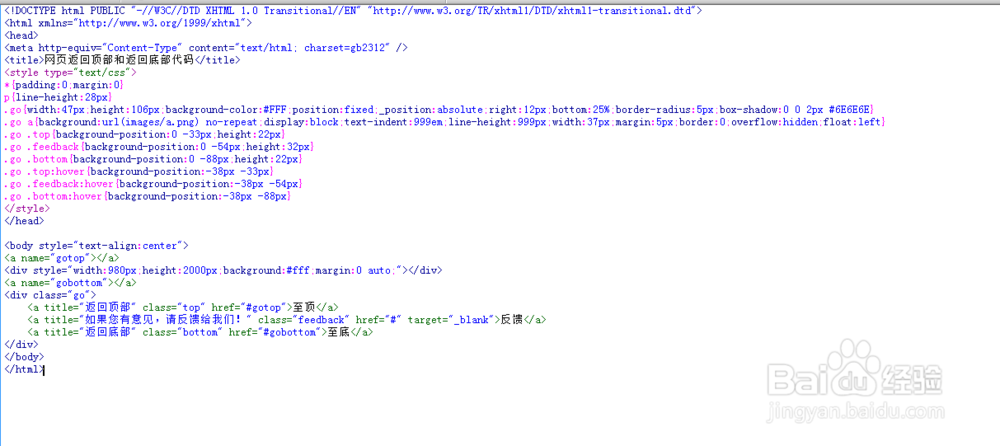
6、查看效果。