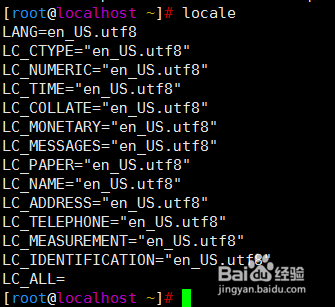
1、locale命令查看系统字符集
2、cat /etc/locale.conf
当前系统为英文字符集,需要切换到中文字符集

3、切换之前先备份配置文件
cp /etc/locale.conf /etc/locale.conf_bak

4、[root@localhost ~]# echo "LANG=zh_CN.utf8" > /etc/locale.conf
[root@localhost ~]# cat /etc/locale.conf
LANG=zh_CN.utf8

5、重启操作系统
reboot

6、切换完成之后测试

7、中文切换到英文字符集
echo "LANG=en_US.utf8" > /etc/locale.conf

8、同样需要重启服务器操作
reboot

9、重启完成继续验证,字符集从中文变回了英文
